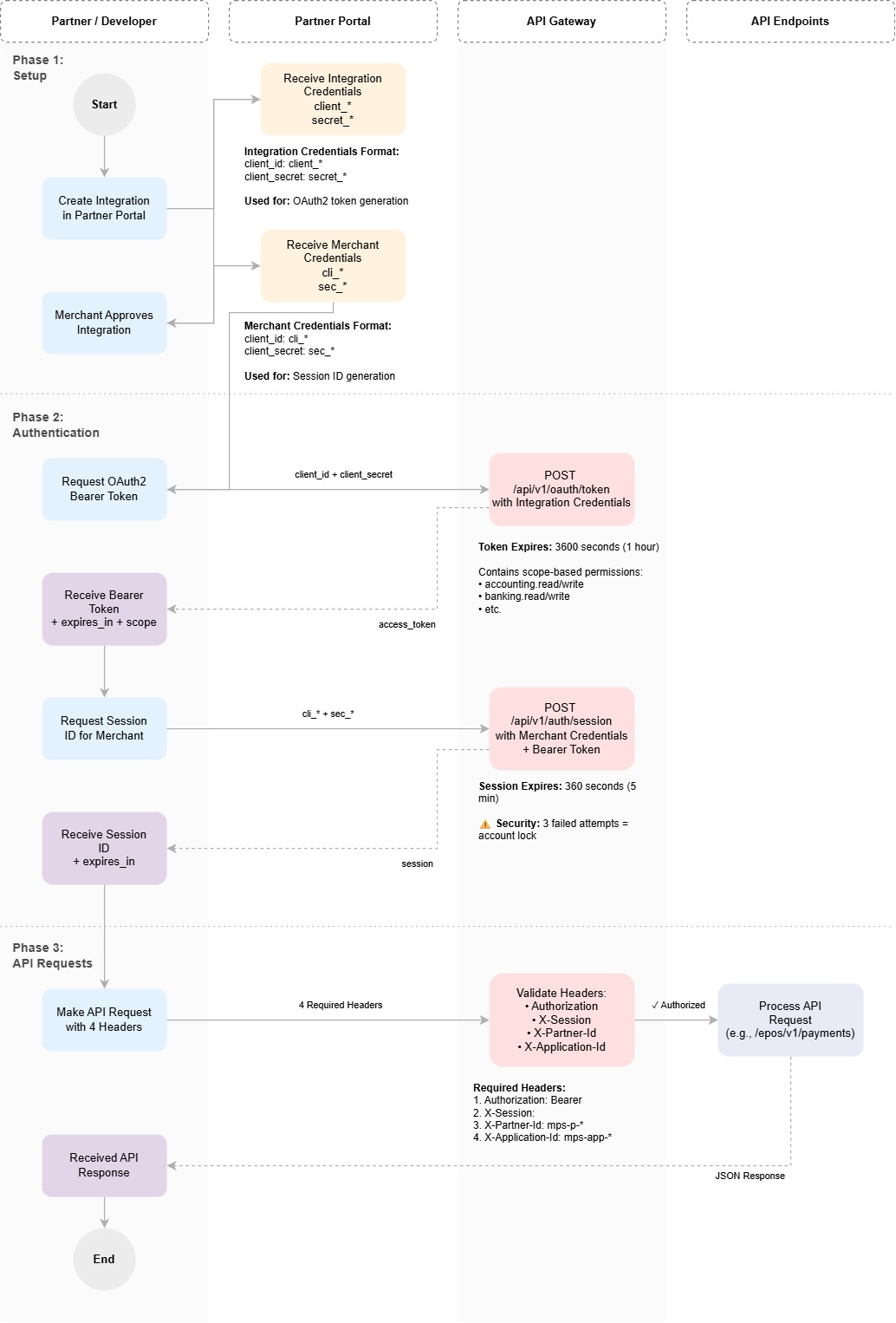
Authentication Overview
The myPOS API Gateway uses a dual-authentication mechanism combining OAuth2 Bearer tokens and Session IDs to secure all API endpoints. This approach ensures both partner authentication and merchant authorization for every request.
Access the Partner Portal
We have two separate portals available. Choose the correct portal based on your environment:
| Portal | URL | Environment |
|---|---|---|
| Production | https://partners.mypos.com | Live environment with production credentials and API endpoints |
| Demo | https://demo-partners.mypos.com | Development and testing environment with demo credentials |
Prerequisites
1. Partner Integration Setup
Partners must first create an Integration in the myPOS Partner Portal. Each integration receives unique credentials:
| Credential | Format | Example |
|---|---|---|
client_id | client_* | client_95b0d079f395435aaf34dda1d9738b37 |
client_secret | secret_* | secret_66e8622ab22cbff78bc3dc519f26c53b4216ed7839dd3f034b1692addf3dc8d6 |
2. Merchant Approval
After a merchant approves your integration, you'll receive merchant-specific credentials that establish the relationship between your integration and that particular merchant:
| Credential | Format | Example |
|---|---|---|
client_id | cli_* | cli_xz1nFRE9HRbb3u4fcbwUTl5t5Ogd |
client_secret | sec_* | sec_x3iPoYX94LtxXe88RN46GT192rVHZUcvbZ5qgbdqLD1bOa5o1LlziDUnfAkd |
Authentication Flow
Every API Gateway request requires four headers to authenticate and authorize your requests:
| Header | Purpose | Source |
|---|---|---|
Authorization: Bearer <token> | Confirms partner authentication with the gateway | Generated via /api/v1/oauth/token |
X-Session: <session_id> | Confirms the integration-merchant connection | Generated via /api/v1/auth/session |
X-Partner-Id: <partner_id> | Your Partner ID (format: mps-p-*) | Available in Partner Portal |
X-Application-Id: <integration_id> | Your Integration ID (format: mps-app-*) | Available in Partner Portal |
Step 1: Generate OAuth2 Bearer Token
Use your integration credentials to obtain a Bearer token:
curl --request POST \
  --url https://demo-api-gateway.mypos.com/api/v1/oauth/token \
  --header 'Accept: application/json' \
  --header 'Content-Type: application/x-www-form-urlencoded' \
  --data-urlencode client_id=client_YOUR_CLIENT_ID \
  --data-urlencode client_secret=secret_YOUR_CLIENT_SECRET \
  --data-urlencode grant_type=client_credentials
Response:
{
  "access_token": "YOUR_GENERATED_BEARER_TOKEN",
  "expires_in": 3600,
  "token_type": "Bearer",
  "scope": "accounting.read accounting.write banking.read banking.write"
}
Step 2: Create Session ID
Use your merchant-specific credentials and the Bearer token from Step 1 to obtain a Session ID:
curl --request POST \
  --url https://demo-api-gateway.mypos.com/api/v1/auth/session \
  --header 'Accept: application/json' \
  --header 'Authorization: Bearer YOUR_GENERATED_BEARER_TOKEN' \
  --header 'Content-Type: application/json' \
  --data '{
  "client_id": "cli_YOUR_CLIENT_ID",
  "client_secret": "sec_YOUR_CLIENT_SECRET"
}'
Response:
{
  "session": "YOUR_GENERATED_SESSION_ID",
  "expires_in": 3600
}
Step 3: Make Authenticated API Requests
Include all four headers in every API Gateway request:
curl --request POST \
  --url https://demo-api-gateway.mypos.com/epos/v1/payments \
  --header 'Accept: application/json' \
  --header 'Content-Type: application/json; x-api-version=1' \
  --header 'Authorization: Bearer <YOUR_BEARER_TOKEN>' \
  --header 'X-Application-Id: mps-app-<YOUR_APPLICATION_ID>' \
  --header 'X-Partner-Id: mps-p-<YOUR_PARTNER_ID>' \
  --header 'X-Session: YOUR_GENERATED_SESSION_ID' \
  --data '{
  ...
}'
Generate OAuth2 Bearer Token
The OAuth2 token endpoint authenticates your partner integration with the API Gateway using the Client Credentials grant type. This token proves your identity as a registered partner.
Endpoint: POST /api/v1/oauth/token
Key Characteristics:
- Use your integration credentials (
client_idandclient_secretfrom the Partner Portal) - Credentials must be submitted in URL-encoded format (
application/x-www-form-urlencoded) - Returns a Bearer token with scope-based permissions (e.g.,
accounting.read,banking.write) - The token expires after the time specified in
expires_in(typically 3600 seconds / 1 hour) - Include the token in the
Authorization: Bearer <token>header for all subsequent API requests
Required Parameters:
client_id: Your integration's client IDclient_secret: Your integration's client secretgrant_type: Must be set toclient_credentials
Create Session for Merchant
The session endpoint establishes a connection between your integration and a specific merchant. This confirms that the merchant has authorized your integration to access their data.
Endpoint: POST /api/v1/auth/session
Key Characteristics:
- Requires the Bearer token from the OAuth2 endpoint in the
Authorizationheader - Use your merchant-specific credentials (received after merchant approval) in the request body
- Credentials must be submitted as JSON in the request body
- Returns a session token that identifies the integration-merchant relationship
- The session token must be included in the
X-Sessionheader for all API requests - Sessions expire after the time specified in
expires_in(typically 360 seconds / 5 minutes) - Security: Three consecutive failed authentication attempts will lock the account
Required Headers:
Authorization: Bearer <token>: The OAuth2 token from Step 1
Required Parameters:
client_id: The merchant-specific client ID (format:cli_*)client_secret: The merchant-specific client secret (format:sec_*)
Authentication Flow Diagram
The diagram below illustrates the complete authentication flow for the myPOS API Gateway: